KIT REVIEW
Rain Design mStand Review: The Desktop Stand for Your Cape Town Home Office
BaseCPT Verdict
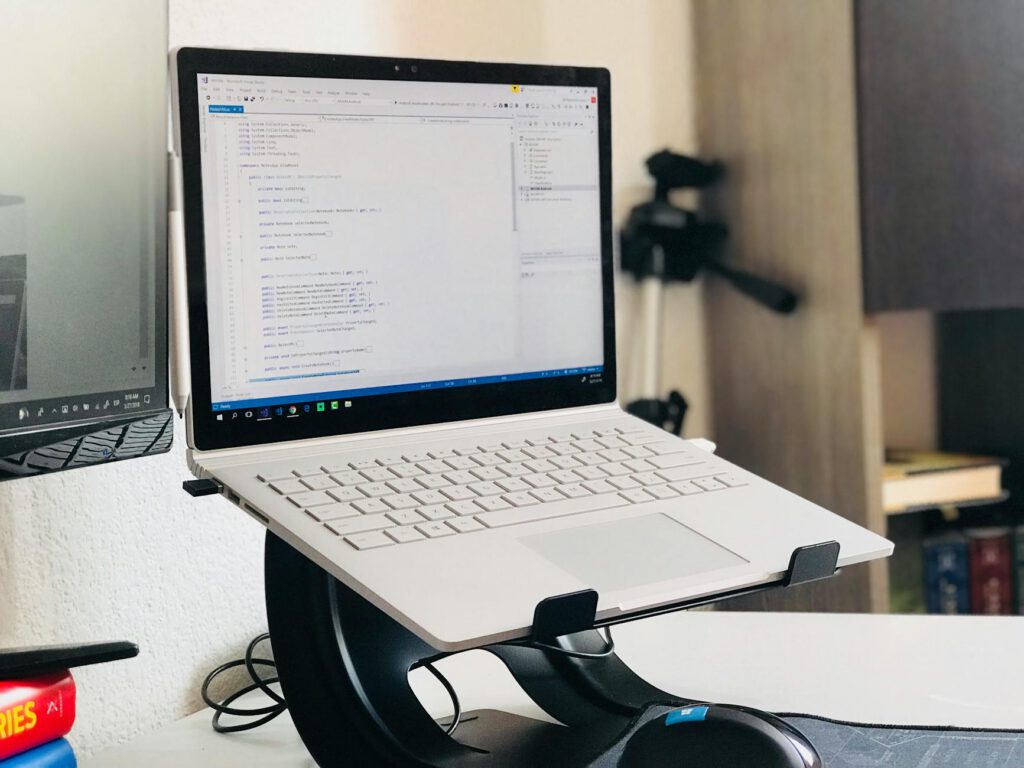
What It Is and Who It’s For
The Rain Design mStand is a solid aluminium laptop stand that weighs 1.4kg and isn’t going anywhere. You put it on your desk, place your laptop on it, and it stays there. No folding, no portability, no pretending it fits in a backpack.
This is the opposite philosophy from the Nexstand K2. Where the Nexstand is designed for people who move between locations, the mStand is for people who’ve found their spot. Maybe you’ve settled into a long-term apartment in Green Point or Woodstock. Maybe you’ve got a desk in a dedicated coworking space. Maybe you’ve figured out that your best working arrangement involves a fixed home setup supplemented by occasional cafe sessions.
The mStand raises your laptop screen to approximately eye level using a single piece of formed aluminium. It includes a cable-routing hole in the back panel and a rubber-padded surface that grips your laptop. The design hasn’t changed much since Rain Design introduced it over a decade ago, because it didn’t need to.
In South Africa, expect to pay R1,800 to R2,500 depending on the finish (silver or space grey) and the retailer. It’s available from Apple Premium Resellers like iStore, as well as online retailers. The space grey version sometimes costs R200-R300 more.
Key Specs
- Material: Single piece of sand-blasted aluminium
- Weight: 1.4kg
- Dimensions: 25cm (W) x 22cm (D) x 15cm (H, at laptop rest point)
- Screen elevation: Raises laptop approximately 15cm above desk surface
- Maximum laptop size: Comfortably fits up to 15-inch laptops (16-inch MacBook Pro fits but overhangs slightly)
- Cable routing: Rear hole for cable management
- Ventilation: Open rear design allows airflow under laptop
- Finish: Sand-blasted aluminium, available in silver and space grey
- Price in SA: R1,800 – R2,500
What We Tested
We used the mStand as a permanent fixture on a desk in a Green Point apartment for four weeks, paired with a 14-inch MacBook Pro, Apple Magic Keyboard, and Logitech MX Master 3 mouse.
Desk setup and first impressions: The mStand arrives fully assembled — there’s nothing to build, unfold, or configure. You take it out of the box, set it on the desk, and put your laptop on it. The sand-blasted aluminium matches Apple’s laptop finishes almost exactly (the space grey version is a close match to recent MacBook colours). On a clean desk, it looks like the laptop is floating on a sculptural pedestal.
Ergonomic positioning: At 15cm elevation, the mStand places the top of a 14-inch MacBook Pro’s screen at approximately eye level for someone of average height (170-180cm) using a standard office chair. This is the correct ergonomic position — eyes level with the top third of the screen, no downward neck tilt. After four weeks of consistent use, the chronic neck tension that had built up from months of flat-laptop use was noticeably reduced.
Thermal performance: The mStand’s aluminium body acts as a passive heat sink. The laptop’s base sits on the aluminium surface, which draws heat away from the chassis. During sustained workloads (video calls, multiple browser tabs, design software), the MacBook Pro’s fans activated less frequently and at lower speeds compared to the laptop sitting flat on the wooden desk. The open back also allows natural convection. Cape Town apartments without aircon get warm in February and March — the mStand’s thermal benefits are welcome during those months.
Cable management: A single circular hole in the mStand’s rear panel lets you route one or two cables from behind. We fed the USB-C charger cable through it, which kept the cable path clean and the desk surface uncluttered. The hole is about 3cm in diameter, large enough for most cables but not for bulky adapters or multi-cable bundles. If you’re running a dock with multiple connections, the cable management helps but doesn’t solve everything.
Stability testing: The mStand weighs 1.4kg and sits on four rubber feet. It does not move. We deliberately pushed the laptop sideways, bumped the desk, and leaned on the desk edge. The mStand stayed put every time. This is the fundamental advantage of a heavy, non-portable stand. The rubber pad on the top surface keeps the laptop from sliding, and the weight of the stand itself resists tipping or shifting.
Long-term desk use: After four weeks, the mStand looks identical to the day it arrived. No scratches on the aluminium, no wear on the rubber pads, no degradation of any kind. This is a product that, barring physical damage, should last essentially forever. There are no moving parts, no joints, no mechanisms to wear out.
What’s Good
The build quality sets a standard. Single-piece aluminium construction means no joints, no screws, no plastic components. The sand-blasted finish is identical in texture and colour to Apple’s laptop finishes. This sounds like an aesthetic detail, but it’s also a durability feature: there’s nothing to break, loosen, or degrade with daily use.
Stability is absolute. After testing the Nexstand K2 at cafes where table bumps caused minor wobbles, using the mStand at home felt like switching from a bicycle to a train. The laptop sits immovably on the stand. You can type aggressively on an external keyboard, reach across for your coffee, or accidentally kick the desk leg without the screen shifting. For long work sessions, this kind of stability is an ergonomic benefit in itself — no unconscious visual adjustment as the screen moves.
Thermal management is a genuine performance benefit. If you’ve used a laptop on a desk in a Cape Town apartment during summer, you know the fans become a constant companion. The mStand’s aluminium body and open-back design make a measurable difference. We didn’t run formal thermal benchmarks, but the subjective experience was clear: fewer fan activations, less heat on the laptop’s bottom surface, and the aluminium stand itself staying cool to the touch even after hours of use.
The fixed height is actually the right height for most people. Non-adjustable sounds like a limitation, but Rain Design chose 15cm of elevation because it works for the majority of people at standard desk heights. The mStand’s angle and height put most 13-15 inch laptop screens in the correct ergonomic position without fiddling with settings. In four weeks of testing, we never wished for a height adjustment.
Cable routing makes a clean desk achievable. The rear cable hole is a small feature with disproportionate impact. Running the charger cable through the stand and down to the wall outlet means one fewer cable visible on the desk surface. In a small Cape Town apartment where your desk might also be your dining table or living space, visual tidiness matters for mental clarity and for being able to quickly clear the space.
It pairs naturally with a portable monitor. If you’re running a Lenovo ThinkVision M14 or similar portable monitor as a second screen, the mStand elevates the laptop to a height that’s close to level with the portable monitor sitting on the desk surface. This creates a more natural dual-screen arrangement than having both screens flat on the desk at the same height.
What’s Not
It is not portable in any meaningful sense. 1.4kg of solid aluminium does not go in your backpack. The mStand is a home or fixed-desk product. If you split your time 50/50 between a home setup and coworking spaces, you’ll need a separate portable solution (like the Nexstand K2 at R500) for your mobile days. That’s an additional purchase, but the two products serve completely different use cases.
R1,800-R2,500 is a lot for a piece of aluminium. There’s no electronics, no motor, no smart features. You’re paying for design, materials, and the Rain Design name. Generic aluminium laptop stands exist on Takealot for R400-R800. They’re not as well-finished or as precisely angled, but they raise your laptop off the desk and provide similar basic ergonomic benefits. The mStand’s premium is justified by build quality and longevity, but budget-conscious buyers should know the alternatives exist.
No height adjustment. The fixed 15cm elevation works for most people, but not all. If you’re significantly taller or shorter than average, or if you use a non-standard chair height, the mStand’s screen position might be slightly too high or too low. There’s no way to adjust it. You adapt by raising or lowering your chair, which may create its own ergonomic issues.
The 16-inch MacBook Pro overhangs. The mStand was designed when 15-inch laptops were the maximum. Apple’s 16-inch MacBook Pro fits on the stand and works fine, but the front edge overhangs by about 1cm. This doesn’t affect stability or function, but the visual alignment isn’t as clean as with a 14 or 15-inch laptop.
Requires an external keyboard and mouse (same as any elevated stand). Like the Nexstand K2, using the mStand means your laptop’s built-in keyboard is at an uncomfortable height. You need an external keyboard and mouse or trackpad. If you’re setting up a permanent home desk, you probably already have these. If not, add R600-R2,000 to the setup cost.
The rear cable hole is small. One to two cables fit comfortably. If you’re connecting a charger, an external monitor, and a USB hub, you’re routing some cables around the stand rather than through it. A wider opening or multiple holes would improve the cable management for more complex setups.
How It Compares
Against the Nexstand K2 (~R500): Entirely different products for different use cases. The Nexstand folds into your bag for cafe and coworking use. The mStand stays on your desk at home. If you work from multiple locations, you might own both. The Nexstand is the better value for its purpose; the mStand is the better stand for a fixed desk.
Against the Twelve South Curve SE (~R1,600-R2,000): Similar concept, slightly different execution. The Curve SE uses a bent aluminium design with a matte black or white finish. It’s lighter than the mStand (680g) and allows some airflow from below. The mStand is heavier (more stable) and has better cable routing. Both are good; the choice is aesthetic and price-dependent.
Against the generic aluminium stands on Takealot (R400-R800): These do the basic job. The aluminium is thinner, the rubber pads are less refined, and the aesthetics are utilitarian. For a temporary setup or tight budget, they’re adequate. The mStand is what you buy when you’ve committed to a location and want something that matches the quality of the laptop sitting on it.
The Verdict
The Rain Design mStand does one thing extremely well: it turns a laptop into an ergonomic workstation on a permanent desk. The single-piece aluminium construction means nothing breaks. The weight means nothing moves. The design means your desk looks intentional rather than improvised.
For Cape Town remote workers who’ve established a home office — whether that’s a dedicated room in a Woodstock apartment or a corner of a kitchen table in Green Point — the mStand is the foundation of a proper working setup. Pair it with a Bluetooth keyboard, a decent mouse, and possibly a portable monitor, and you have a desk arrangement that’s comfortable for eight-hour work days.
The price is premium for what is, materially, a shaped piece of metal. But the mStand is the kind of product you buy once and use for years. In a city where many remote workers cycle through temporary gear and disposable solutions, there’s something to be said for buying the permanent version.
If you’re still nomadic within Cape Town — different cafe each day, coworking spaces three days a week — this isn’t for you yet. Get the Nexstand K2 for R500 and revisit the mStand when you’ve found your base.
Quick Reference
| Price | R1,800 – R2,500 (depending on finish) |
| Where to buy | iStore, Incredible Connection, Core Computer Group, Takealot |
| Best for | Permanent home office or fixed desk setup, anyone wanting clean desk aesthetics |
| Not ideal for | Mobile workers, budget-first buyers, 16-inch laptop users wanting a flush fit |
| Rating | 4.3 / 5 |