KIT REVIEW
EcoFlow River 2 Max Review: The Load Shedding Essential
BaseCPT Verdict
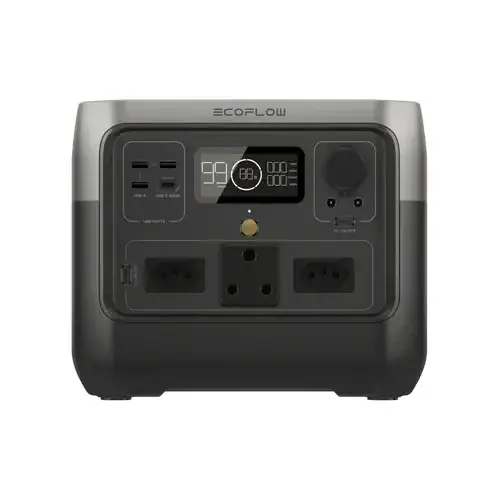
Kit Review — Portable Power
The load-shedding essential. 512Wh portable power station that charges your laptop three times over, gets from 0–80% in 45 minutes, and keeps your router, ONT, and monitor running through a Stage 4 slot. The single best investment for remote work continuity in South Africa.
Why this matters more in Cape Town than anywhere else
Load shedding is not an edge case here — it is scheduled infrastructure. At Stage 4, you are looking at 6–8 hours of outages per day, typically split into two or three blocks. When the power goes out, the cascade is immediate: your fibre ONT loses power first (those little white boxes have no battery), then your router goes dark, and suddenly your LTE backup is the only thing standing between you and a missed deadline.
The EcoFlow River 2 Max breaks that cascade. Plug your ONT, router, and laptop charger into it, and load shedding becomes a mild inconvenience rather than a work stoppage. The 512Wh capacity is enough to run a typical home office setup — router, ONT, 15-inch laptop, and a small desk lamp — for 6 to 8 hours continuously. That covers almost any Stage 4 double-slot without needing a recharge in between.
Charging speed: the real differentiator
Most portable power stations in this price range take 5 to 7 hours to charge from a wall outlet. The River 2 Max uses EcoFlow’s X-Stream technology to get from flat to 80% in 45 minutes — full charge in around an hour. That window matters enormously when load shedding is on a schedule. If you have a two-hour window of power between blocks, you can top the unit up from 20% to near-full and be ready for the next outage before it starts.
For remote workers in shared spaces, this also means you can charge at a coworking venue during the day and work at home through the evening outage without anxiety about running dry.
What it runs and for how long
Tested configuration: MacBook Pro 14-inch (M3), Asus router, TP-Link ONT, and a 24-inch monitor. Combined draw: around 80W. At that load, the River 2 Max delivers just over 6 hours of runtime. Drop the monitor and you are looking at closer to 8–9 hours from the router and laptop alone.
Pure laptop use: roughly three full charges of a 16-inch MacBook Pro, or four charges of a 13-inch. If your work is laptop-only with no peripherals, this unit can keep you running for a full working day and most of the evening from a single charge.
Build quality and portability
At 6.1 kg, the River 2 Max is on the heavier side for a portable station, but lighter than most 500Wh competitors. The handle is solid and the unit is compact enough to sit on a desk without dominating it. Fan noise is minimal during light loads — the fan only spins up noticeably when drawing above 200W, which is more than most home office setups will ever pull. For a café or quiet coworking environment, it is not disruptive.
The unit has two AC outlets (220V SA spec), two USB-C ports (one up to 100W), two USB-A ports, and a 12V car outlet. The 100W USB-C port will charge a MacBook at full speed directly, so you can skip the laptop brick entirely if you prefer.
Solar compatibility
The River 2 Max accepts up to 220W of solar input. If you are on a property with roof access or a sunny balcony, a 200W portable panel (around R2,500–R3,500 locally) turns this into a fully off-grid setup. Practical for weekend getaways in the Cape Winelands or extended stays in areas with less reliable grid power than central Cape Town.
Trade-offs
At R7,450, this is not an impulse purchase. The EcoFlow RIVER 2 (non-Max, 256Wh) is available for around R4,200 and covers laptop-only use adequately if you do not need to run a router and monitor simultaneously. The Jackery Explorer 300 is cheaper still but charges much more slowly — the 45-minute X-Stream charge is the River 2 Max’s strongest feature, and it is genuinely hard to replicate at this price point.
There is no built-in screen brightness adjustment in the app (a minor irritation), and the LCD display showing remaining capacity is not always accurate below 20% — it can drop suddenly. Keep it topped above 20% as a practical rule.
Who it is for
Digital nomads and remote workers based in Cape Town who cannot afford downtime during load shedding. Particularly valuable if you work from home (no coworking backup), have fibre internet (ONT dies without power), or run video calls where sudden disconnection is professionally costly. Available on Takealot with next-day delivery to most Cape Town addresses.