KIT REVIEW
Anker 341 USB-C Hub (7-in-1) Review: The Dongle That Actually Earns Its Desk Space
BaseCPT Verdict
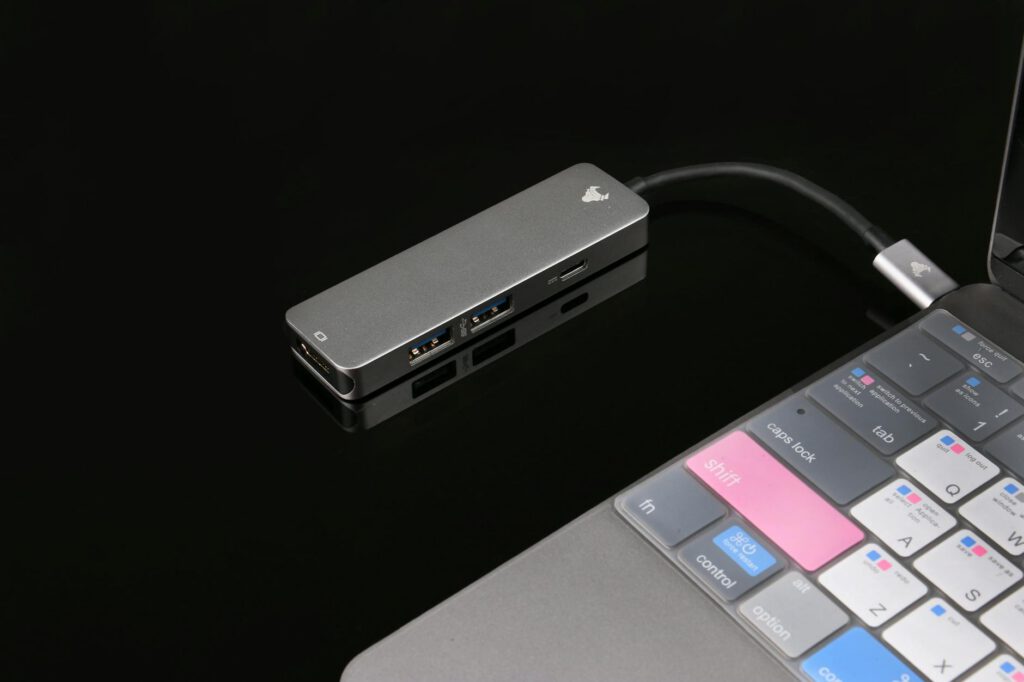
If you’re working remotely from Cape Town with a modern laptop, you already know the problem: two USB-C ports and not much else. Need to connect an external monitor at a coworking space? Plug in a USB drive from a client? Transfer photos from an SD card after a weekend shooting content at Kalk Bay? You need a hub, and you need one that won’t die on you mid-presentation.
The Anker 341 USB-C Hub (7-in-1) is one of the most popular options in this price bracket. I’ve been using it daily for the past three months — at coworking desks in Woodstock, cafe tables in Observatory, and my home setup in Green Point. Here’s whether it deserves a spot in your laptop bag.
What It Is and Who It’s For
The Anker 341 is a compact USB-C hub that expands a single USB-C port into seven connections. It’s aimed at laptop users who need basic port expansion without spending R2,000+ on a docking station. If you carry a MacBook Air, Dell XPS, or any USB-C-only laptop between your apartment and various workspaces around Cape Town, this is the category of accessory you’re shopping in.
It’s not a Thunderbolt dock. It won’t drive dual 4K monitors or charge your laptop at full speed. But for the price, it covers the ports most remote workers actually use day to day.
Key Specs
- Ports: 1x HDMI (4K@30Hz), 2x USB-A 3.0, 1x USB-C data, 1x USB-C PD passthrough (up to 85W), 1x SD card, 1x microSD card
- HDMI output: 4K at 30Hz or 1080p at 60Hz
- USB-A data transfer: Up to 5Gbps
- PD passthrough: Up to 85W (with some overhead loss)
- Cable length: ~16cm integrated cable
- Weight: 63g
- Build: Aluminium shell
- Price (ZAR): R650-R850 on Takealot, depending on stock and seller
What We Tested
I used the Anker 341 across three common Cape Town remote work scenarios over 12 weeks:
Coworking spaces: Connected to external monitors at Workshop17 and Open, where you often get a monitor but need your own adapter. Tested HDMI output stability over full workdays.
Cafe work: Plugged in at spots around Kloof Street and Bree Street, testing how much heat the hub generates when you’re using it with a charger passing through and a USB mouse connected simultaneously.
Home office: Daily use with a portable 15.6″ USB-C monitor, external keyboard receiver, and SD card transfers from a Sony camera.
What’s Good
It just works with monitors. This sounds basic, but after trying two cheaper hubs that would intermittently drop HDMI signal, the Anker 341 has been solid. Plug it into a coworking space monitor, select the right input, and you’re running. Over three months of near-daily use, I had exactly one HDMI dropout — and that turned out to be a dodgy cable at the venue.
PD passthrough keeps your laptop alive. Working from a cafe with limited outlets, you can run your charger through the hub and still use all the other ports. The 85W passthrough means some power is lost to the hub itself — my 67W MacBook charger still charges fine, but noticeably slower than plugging in directly. For a full workday at a coworking desk, this is a non-issue. You’ll end the day with a full battery regardless.
SD card slots are genuinely useful. If you’re creating content for your blog, social channels, or freelance clients, having both SD and microSD slots saves carrying a separate card reader. Transfer speeds are reasonable — not the fastest I’ve tested, but adequate for moving a batch of photos without wanting to throw the thing out the window.
Build quality is solid for the price. The aluminium shell feels like it can survive being tossed into a backpack daily. The integrated cable is short enough to not tangle but long enough to reach comfortably. After three months of daily use, no physical wear visible.
Size and weight are right. At 63g, you forget it’s in your bag. It’s smaller than most pens and fits in any laptop sleeve pocket. When you’re walking between your apartment and a coworking space, or packing for a weekend working from Stellenbosch, every gram and centimetre counts.
What’s Not
It gets warm. This is the most common complaint you’ll find online, and it’s real. When you’re running HDMI output, PD passthrough, and a couple of USB devices simultaneously, the aluminium shell gets noticeably warm. Not hot enough to burn, but warm enough that I wouldn’t rest it on a wooden cafe table surface without thinking twice. During a long summer afternoon session at a Sea Point cafe with poor airflow, it got warmer than I’d like. It never failed or throttled in my testing, but the heat is there and worth knowing about.
4K is limited to 30Hz. If you’re connecting to a 4K monitor, you’re capped at 30 frames per second. For document work, email, and web browsing, this is fine — you won’t notice. But if you’re doing any design work, video editing, or even just scrolling quickly through long documents, the 30Hz refresh rate feels sluggish compared to 60Hz. At 1080p you get 60Hz, which is smooth. This is a hardware limitation at this price point, not an Anker-specific problem.
The integrated cable is short. At roughly 16cm, the cable keeps things tidy but can be awkward depending on where your USB-C port sits relative to your desk setup. On a MacBook with left-side ports, the hub ends up hovering off the left edge of your laptop. It works, but it’s not elegant, and in tight cafe setups it can get in the way.
PD passthrough has overhead. Anker rates it at 85W, but that’s the maximum input — the hub skims some power for itself. If you have a laptop that needs 100W charging (some larger Windows machines), you’ll charge slowly or not at all under heavy load. For most ultrabooks and MacBooks, this won’t matter.
No ethernet port. If your Airbnb’s Wi-Fi drops and you want to hardwire into the router, you’ll need a separate USB-to-ethernet adapter. Some competing hubs in this price range include one.
Alternatives Worth Considering
Ugreen 7-in-1 USB-C Hub (R600-R750): Very similar spec sheet, slightly cheaper, but I’ve found Anker’s driver compatibility more reliable across different monitors. Available on Takealot.
Anker 553 USB-C Hub (8-in-1) (R1,100-R1,300): Steps up to include an ethernet port and slightly better PD passthrough. Worth the premium if you regularly need wired internet.
Apple USB-C Digital AV Multiport Adapter (R1,200+): Only gives you HDMI, USB-A, and USB-C. Fewer ports for more money, but it’s Apple-certified and slim. Only makes sense if you exclusively use Apple gear and want guaranteed compatibility.
The Verdict
The Anker 341 does exactly what most Cape Town remote workers need: it reliably connects your laptop to monitors, peripherals, and storage cards without costing a fortune or taking up bag space. The heating and 30Hz 4K limitations are real drawbacks, but they’re expected at this price point and don’t affect typical workday use.
If you’re setting up your remote work kit and need a single hub that handles coworking monitors, cafe charging, and occasional SD card transfers, the Anker 341 earns its spot. It’s the hub I grab every morning when I leave the apartment, and three months in, I haven’t felt the need to replace it.
Quick Reference
| Product | Anker 341 USB-C Hub (7-in-1) |
| Price | R650-R850 (Takealot) |
| Where to buy | Takealot, Amazon (shipped), iStore (sometimes stocked) |
| Best for | Remote workers needing reliable port expansion on the move |
| Skip if | You need 4K@60Hz, ethernet, or 100W+ passthrough charging |
| Rating | 4 out of 5 |